Is Your Current Scanner
Delivering Everything
BetBurger Could?
Put BetBurger to the test against the software you already use. Compare opportunity coverage, scanning features, filters and usability — and discover whether BetBurger is the upgrade your workflow needs.
Your Current Scanner
Could it be limiting your workflow?
- Limited bookmaker coverage?
- Missing opportunity types?
- Fewer filtering options?
- Difficult interface navigation?
- Slower market updates?
- Limited stake calculation tools?
With BetBurger
More tools. More control.
- Extensive bookmaker coverage
- Surebets, Valuebets and Middles
- Advanced customizable filters
- Centralized scanning interface
- Prematch and live scanning options
- Integrated stake calculator
- Detailed opportunity analysis
Put BetBurger to the Test. See the Difference for Yourself.
Compare the opportunities BetBurger identifies with those found by your current scanner. Evaluate the tools, market coverage and workflow to see which solution works best for you.
Comparison points are illustrative and depend on your current software. Coverage, speed and features vary by provider and subscription. Theoretical opportunities do not guarantee successful execution or profit. Affiliate links may earn us a commission at no extra cost to you.
Master BetBurger with Our Complete Video Tutorial
Follow a practical, step-by-step walkthrough of the BetBurger platform. Learn how to configure your scanner, create custom filters, understand arbitrage signals and evaluate potential opportunities.
What You’ll Learn in This Tutorial
A complete walkthrough designed to help you understand the platform and its most important tools.
Getting Started
Account access, platform navigation and understanding the main dashboard.
Creating Custom Filters
Configure bookmakers, sports, markets and profitability settings.
Understanding Signals
Learn how to read scanner results, odds, markets and opportunity alerts.
Prematch & Live Scanning
Understand the differences between pre-event and in-play opportunities.
Using the Stake Calculator
Estimate stake distribution, theoretical returns and potential profitability.
Verifying Opportunities
Check odds, settlement rules, bookmaker limits and execution risks.
Educational content only. Scanner results and theoretical returns do not guarantee profit. Affiliate links may generate a commission at no additional cost to you.
Watch BetBurger in Action
See how BetBurger displays arbitrage opportunities, refreshes odds and updates scanner results as market conditions change.
See Opportunities as They Appear
Watch a real recording of the BetBurger scanner and observe how the opportunity list changes as bookmaker odds and market conditions are updated.
Continuous Updates
Observe new opportunities, changing odds and refreshed scanner results.
Opportunities in One Place
Explore how the platform organizes markets, bookmakers and potential arbitrage margins.
Actual Scanner Interface
See a genuine screen recording of BetBurger instead of a promotional mockup.
This recording demonstrates how the interface behaves. Displayed opportunities are historical and may no longer be available.
Discover the Tools Behind the Opportunities
Explore BetBurger’s scanning features, filtering options and available plans.
Educational demonstration only. Scanner results and theoretical margins do not guarantee successful execution or profit. Affiliate links may earn a commission at no extra cost to you.
Hundreds of Bookmaker Options.
One Powerful Scanner.
Discover the extensive bookmaker coverage available through BetBurger. Choose Prematch or Live to explore bookmakers, regional versions and alternative feeds supported by each scanner.
Explore Prematch Bookmakers
Discover bookmaker names and regional versions associated with pre-event scanning. Expand the directory to browse the available names.
Explore the Full BetBurger Scanner
Configure your preferred bookmakers, explore scanning options and see how BetBurger fits your arbitrage workflow.
Find the Opportunities
That Matter to You.
BetBurger allows you to customize how you discover arbitrage opportunities. Select your bookmakers, define profit and odds ranges, choose sports and betting markets, and create filters that match your own workflow.
Control Profit, Odds & Timing
Define which opportunities should appear based on their theoretical arbitrage percentage, available odds and how recently the scanner detected them.
Try an Example Filter
Educational example only. These inputs demonstrate filter logic and do not connect to BetBurger.
Set a minimum and maximum theoretical arbitrage margin to narrow the opportunities shown.
Restrict opportunities to your preferred decimal odds range.
Filter by the age of a scanner result. A recent result does not guarantee that its odds are still available.
For soccer markets, limit results according to the minute of play where the filter supports it.
Real BetBurger Interface — Quick Filters
Choose the Bookmakers You Actually Use
You do not need every bookmaker enabled in every filter. BetBurger lets you select specific operators, allowing you to focus on combinations relevant to your accounts and available markets.
Example Bookmaker Selection
Select or deselect bookmakers to preview a possible scanner setup. This is not the complete directory.
Include only the bookmakers relevant to your strategy.
BetBurger offers a broader bookmaker selection, depending on scanner mode and coverage.
Use the required-bookmaker setting when you want opportunities involving particular operators.
Different regional feeds or clones may appear separately in the bookmaker directory.
If you primarily use Bet365, Betano and Pinnacle, you can build a filter around those operators instead of reviewing every bookmaker combination available in the scanner.
Focus on Your Preferred Sports & Markets
Customize your scanner by sport, betting market and competition. This is especially useful when your strategy concentrates on particular sports or market types.
Select Sports
Enable the sports you want to scan, from soccer and basketball to many other supported disciplines.
Narrow results using market categories such as 1X2, totals, handicaps and more.
Use geographical and league restrictions where supported.
Build a more specific filter by defining competitions you want to include or avoid.
A soccer-focused user can select Soccer, enable 1X2 and Totals, and exclude unwanted competitions. This makes the results more relevant to that particular strategy.
Real BetBurger Interface — Sports, Bet Types & Leagues
Fine-Tune Your Scanning Rules
Beyond basic percentages and bookmaker selection, BetBurger provides additional settings to refine which opportunities are included in your results.
Example Advanced Settings
Available controls and their behavior depend on the BetBurger filter and scanning mode.
Choose which opportunity categories should be displayed.
Use this setting when comparing markets with matching settlement rules is important.
Restrict combinations according to the bookmaker relationship required by the filter.
Options shown in the interface include hiding certain bet types and handling matches during breaks.
Real BetBurger Interface — Edit Filter
Your Example Scanner Configuration
Experiment with the controls above. This summary updates as you change the example settings, helping you understand how a customized scanner workflow can be organized.
Educational demonstration only. This interactive guide is not connected to BetBurger and does not scan live odds, save filters to your account or generate actual betting opportunities. Software features and coverage may change. Arbitrage margins are theoretical and do not guarantee successful execution or profit. Affiliate links may earn a commission at no additional cost to you.
Finding an Arbitrage Opportunity with BetBurger
Let’s explore a real screenshot of the BetBurger Live scanner. You’ll learn how to identify an opportunity, understand the displayed odds, recognize the bookmakers involved and interpret the scanner’s theoretical arbitrage percentage.
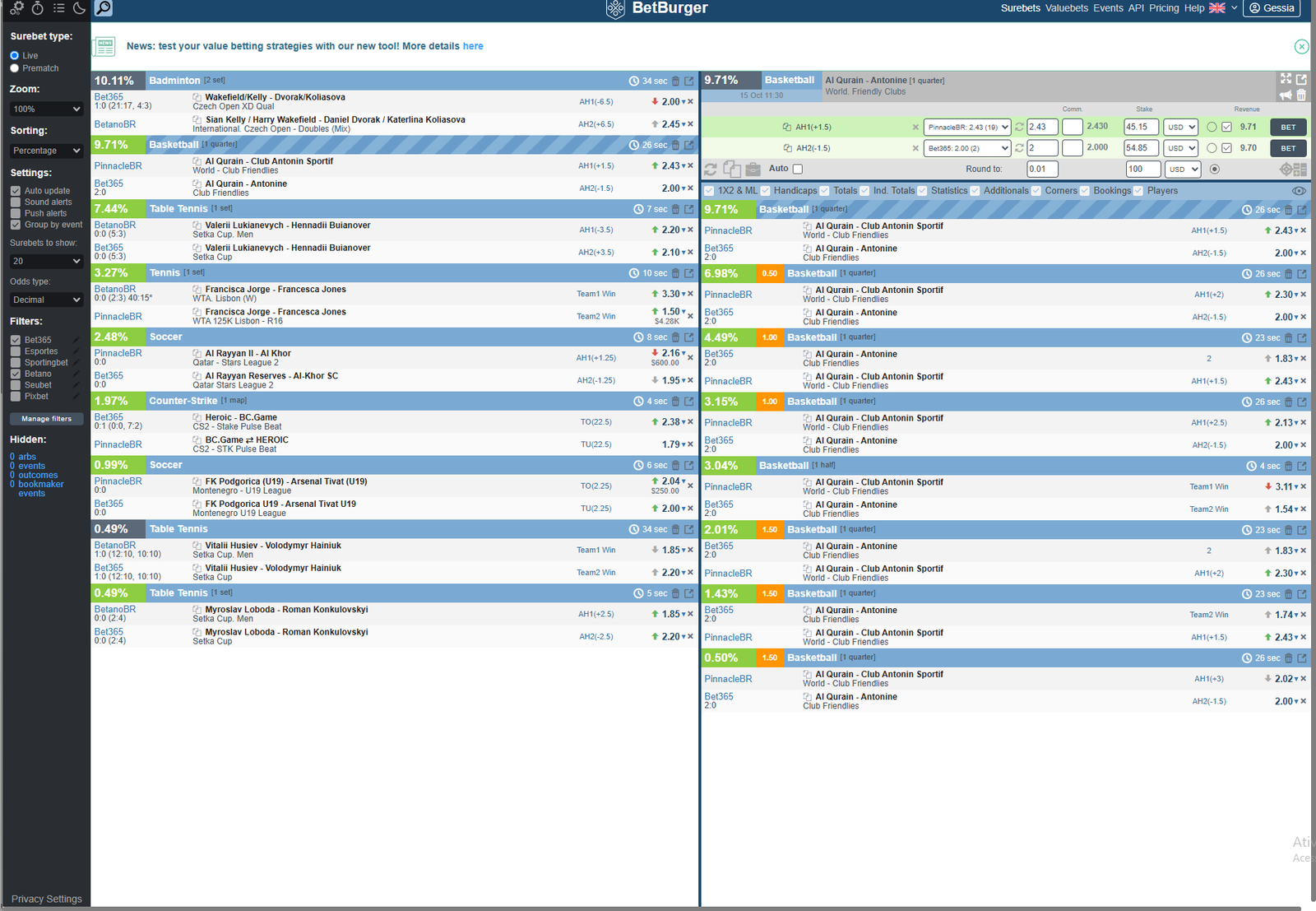
Understanding What You See on the Scanner
Arbitrage Percentage
The percentage displayed beside an opportunity represents its theoretical arbitrage margin. In this screenshot, several opportunities show different percentages, including 10.11% and 9.71%.
Sports and Events
The scanner identifies the sport, competition and event. Here, you can see opportunities involving badminton, basketball, tennis, soccer and other markets.
Bookmakers
BetBurger displays the bookmakers associated with each selection. The screenshot includes Bet365, BetanoBR and PinnacleBR.
Odds and Markets
Each opportunity displays the odds and corresponding market selections. Verify that the outcomes and settlement rules match before considering any bets.
Opportunity Age
The scanner shows how recently an opportunity was updated. In live betting, odds can change quickly, making this information especially important.
Integrated Calculator
Selecting an opportunity opens the calculator, where you can review odds, adjust stake amounts and evaluate the theoretical result before placing any bets.
A 9.71% Basketball Opportunity
In the screenshot, BetBurger displays a basketball opportunity involving PinnacleBR and Bet365. The integrated calculator is open on the right, showing the selected markets, odds and stake distribution.
How BetBurger Calculates Arbitrage Stakes
Finding an opportunity is only the beginning. The next step is understanding how much to place on each selection. Explore a real BetBurger calculator screenshot, then try our interactive example to see how stake distribution works.

Understanding the Real Calculator
This screenshot shows a table tennis opportunity involving BetanoBR and Bet365. BetBurger displays the selections, odds, stake amounts and expected returns in one compact interface.
Try the Arbitrage Calculator
Change the bookmaker odds or total investment directly in the scanner-style interface below. Stake allocation, theoretical margin and potential returns update automatically.
| Selection | Bookmaker | Odds | Decimal | Stake | Currency | Revenue | |
|---|---|---|---|---|---|---|---|
| TO (18.5) Over 18.5 |
BetanoBR
|
2.550 | USD | 1091.66 | BET | ||
| TU (18.5) Under 18.5 |
Bet365
|
1.909 | USD | 1091.76 | BET |
From Learning Arbitrage to Finding Real Opportunities
You've explored the BetBurger scanner, learned how to identify potential arbitrage opportunities, and experimented with stake calculations. Now it's time to explore the real platform and discover how an arbitrage scanner could fit into your betting workflow.
Discover Opportunities
Explore live and pre-match arbitrage opportunities across supported bookmakers and sporting events.
Compare Odds and Markets
Review selections, bookmaker odds, market details and theoretical margins in one organized interface.
Evaluate Before You Bet
Use calculation tools to examine stake distribution and potential returns before making a decision.
Ready to see how BetBurger works? Visit the official platform to explore its features, available plans and tools.
Explore BetBurger